Your guide to websites, digiblogs, gadgets, technology, and modern time living. This blog features the hottest on e-news, gives reassessments on the hottest equipments, gadgets and gear and present information and ideas on how to turn out to be more tech-savvy.

  • Apple iPhone 6 will have More Memory Storage?

    It is said on the report from www.gforgames.com that one of the new handsets could be using a Toshiba 128 GB NAND Flash Chip. Well, we are not sure yet about this report because last year when the rumors about iPhone 5S to have a 128GB of storage also didn't happened...

  • Where and How to get the Golden Eggs on Angry Birds Game?

    Where to find and collect Golden Eggs #1-9 in Angry Birds Golden Egg #1: Let the credits scroll, you’ll find a Golden Egg at the conclusion. – This is the easiest to find a golden egg for me, so go and let the credits scroll till the end and click the golden egg as it appears...

  • The New HP webOS-based TouchPad

    Hewlett-Packard or HP's webOS-based TouchPad is creating buzz since it was launched. This is really the time of the tablets since alm...

30 June, 2006

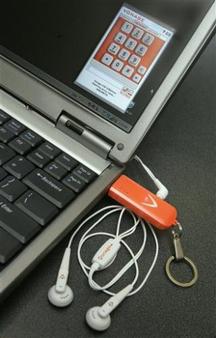
V-phone simplifies Internet calling

It's a top feature of Internet phone service that few bother with: the ability to use it anywhere, making and taking calls from the same number at the same low price, even if you're halfway around the world.
The buzz kill to this dreamy capability is that you usually need either to haul along an adapter to hook up a regular phone to the Internet or install software on any computer you want to call from, a requirement that usually limits you to your own laptop.
Removing that hurdle is the premise behind the V-Phone, Vonage Holdings Corp.'s key-chain device that plugs into any USB port on any Windows-based computer to provide instant Internet calling to and from your number. - Read more
Share:

14 June, 2006

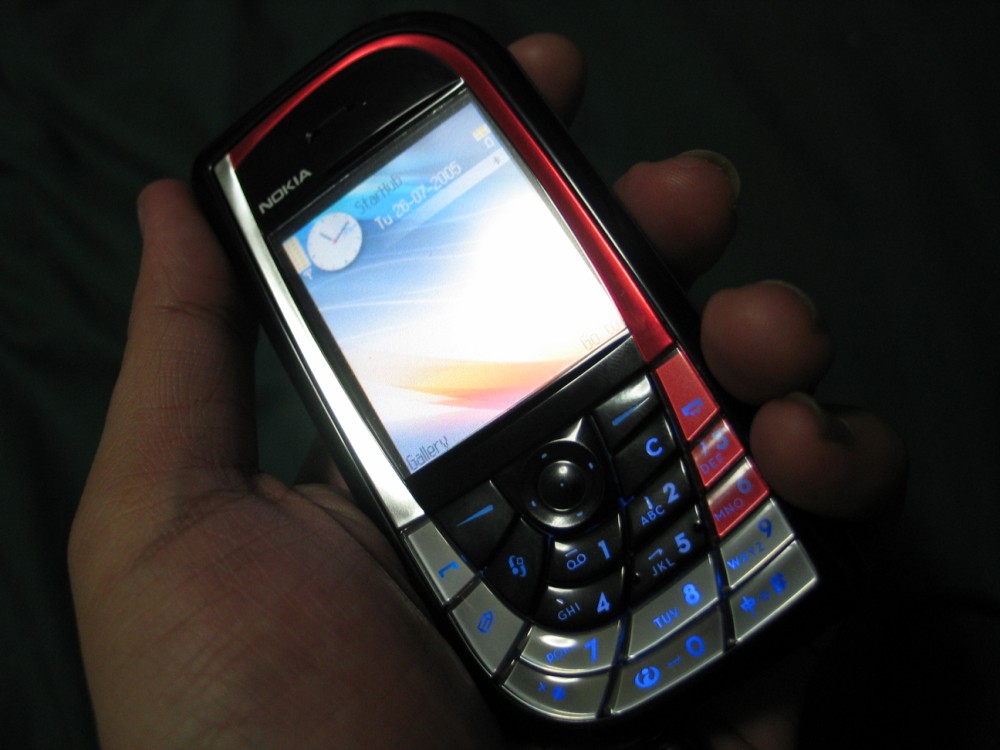
The Nokia 7610

The Nokia 7610 imaging phone with its sleek, compact design stands out in any crowd.

Cut a cleaner profile with a megapixel camera and 4x digital zoom. Quality prints are all the proof you need of your cutting edge savvy.

Score a perfect 10 with up to 10 minutes of video. Edit and shape your vision with the Movie Director application.

Your time is precious. Get a quick introduction to your Nokia 7610 imaging phone with the integrated Welcome Demo.

Show some style with Nokia Xpress-on™ Style Packs' coordinated covers with keymats and wrist straps with matching wallpapers and screensavers.

See How It Works

Key Features

  • Integrated megapixel (1152 x 864 pixels) camera with 4x digital zoom for quality prints
  • Integrated video recorder with audio function and 4x digital zoom for video clips up to 10 minutes long
  • RealOne Player
  • Standard and night camera modes and self-timer
  • Movie Director - Combine video clips, add music, or change styles
  • Created and downloaded digital content (images, sounds, videos) with Gallery storage
  • Welcome Demo for a quick start as well as a Help application that guides you through your phone's many features.
  • 65,536 color-display, 176 x 208 pixels
  • Bluetooth wireless technology and USB connectivity
  • MMS, email, and Instant Messaging
  • Advanced XHTML browser
  • Personalized user interface themes
  • Nokia Xpress-on™ Style Packs

Full Specifications

Tri-band Operation

  • Tri-band coverage on up to five continents (GSM 900/1800/1900 or GSM 850/1800/1900)
  • Automatic switching between bands


Size

  • Weight: 118 g
  • Dimensions: 108.6 mm x 53 mm x 18.7 mm, 93.5 cc


Display and User Interface

  • Bright active matrix TFT color display
  • 65,536 colors
  • 176 x 208 pixel resolution
  • Graphical user interface with selectable themes
  • 5-way navigation key
  • Symbian operating system 7.0s
  • S60 software on Symbian OS


Integrated Digital Megapixel Camera

  • Resolution 1152 x 864 pixels
  • 4x digital zoom
  • Picture modes: Standard, night
  • Self timer
  • Displayed formats: JPEG, GIF87a/89a, EXIF, DCF, WBMP, BMP, MBM, PNG


Video Recorder

  • Resolution: 128 x 96 or 174 x 144 pixels (Sub QCIF or QCIF)
  • Time: Up to 10 minutes
  • 4x digital zoom
  • Recorded formats (encoding): .3gp file format, H.263 video and AMR radio


RealOne Player

  • Download and play multimedia files (video + music)
  • Stream media files through any supported media portals
  • Played formats (decoding): .3gp and .mp4 file formats, MPEG-4 video, H.263 video and AMR audio, RealMedia (Real Video and Real Audio), MP3 and AAC


Memory Functions

  • 8 MB internal dynamic memory for contacts, text messages, multimedia messages, ringing tones, images, video clips, calendar notes, to-do list, and applications
  • 64 MB Reduced Size MultiMediaCard (MMC)


Messaging

  • Multimedia messaging: Combine image, video, text and voice clip and send as MMS to compatible phone or PC; use MMS to tell your story with a multi-slide presentation
  • Automatic resizing of your megapixel image to accommodate fit MMS. (max. 100 KB attachment size)
  • Email: Access email accounts whether work or personal; supports SMTP, POP3, and IMAP4 protocols
  • Text messaging: Supports concatenated SMS; picture messaging; SMS distribution list
  • Predictive text input: Support for all major languages in Europe and Asia-Pacific


Presence

  • Instant Messaging
  • Presence-enhanced contacts


Connectivity

  • Bluetooth wireless technology
  • USB with Pop-Port™
  • Local synchronization of contacts & calendar to compatible PC using PC Suite
  • Remote over-the-air synchronization with SyncML
  • Send and receive images, video clips, graphics and business cards


Browsing

  • Support for HTML, XHTML and WML
  • Full-screen mode
  • OMA DRM - Forward lock for content protection
  • Wallet: Convenient online use and storage of your numbers and passwords


Data Transfer

  • Up to 40.3 kbps in GPRS networks


Call Management

  • Contacts: Advanced contacts database with support for multiple phone and email details per entry, also supports thumbnail picture and groups
  • Speed dialing
  • Logs: Keeps lists of your dialed, received, and missed calls
  • Automatic redial
  • Automatic answer (works with compatible headset or car kit only)
  • Supports Fixed Dialing Number, which allows calls only to predefined numbers
  • Conference call


Java™ Applications

  • Downloadable Java™ MIDP 2.0 applications


Voice Features

  • Voice dialing
  • Voice commands
  • Voice recorder
  • Integrated handsfree speaker


Digital Services

  • Symbian applications available from Nokia Software Market
  • Graphics, icons, animations, logos
  • Games: Possibility to download new games
  • Ringing tones: True Tones, polyphonic tones
  • Themes: Possibility to download new themes


Sales Package Contents

  • Nokia 7610 imaging phone
  • 64 MB Reduced Size MMC
  • Adapter for MMC
  • Li-ion Battery Cell (BL-5C)
  • Travel Charger (ACP-12)
  • USB Connectivity cable (DKU-2)
  • Wrist strap
  • CD-ROM
  • User's Guide
Share:

10 June, 2006

The Nokia 3230

Nokia 3230 smartphone will unleash the creativity in you. This smartphone will let you edit your raw video clips into polished, personalized and complete with soundtrack, by means of using the pre-installed software and after your masterpiece video then you can share it with your friends. You can also create your own ringing tones, print your mobile images, play multiplayer games with the wireless Bluetooth connection and browse HTML and xHTML Web pages. It has 32 MB MMC card and expandable memory to give you lots of space.

Key Features

  • 1.3 megapixel camera (effective resolution 1.23 megapixels for image capture)
  • Customize your muvees with Movie Director
  • xHTML browser for real Web browsing
  • 65,536-color screen
  • Push to Talk with dedicated key
  • Expandable memory (32 MB RS - MMC card included)
  • New multiplayer games over Bluetooth wireless technology
  • Instant messaging with Presence contacts
  • Multimedia messaging
  • Customizable color themes


Full Specifications

Tri-Band Operation

  • Tri-band coverage on up to five continents (EGSM900/GSM1800/1900)
  • Automatic switching between bands


Size

  • Weight: 110 g
  • Dimensions: 109 mm x 49 mm x 19 mm, 90 cc


Display and User Interface

  • Large, high-resolution TFT color display
  • Up to 65,536 colors
  • 176 x 208-pixel resolution
  • Series 60 user interface (UI) with selectable themes


Imaging

Still imaging

  • 1.3 megapixel camera sensor, effective resolution 1.23 megapixels for image capture (image size 1280 x 960 pixels)
  • Image capture: JPEG (16.7 million/24-bit color)
  • Displayed formats: JPEG, GIF87a/89a, EXIF, WBMP, BMP, MBM, PNG


Video

  • Capture video clips up to one hour with 32 MB MMC card
  • Resolution of videos: Q-CIF (176 x 144 Pixel)
  • Video capture: H.263 (16.7 million/24-bit color)


Video Editing

  • Edit your own video clips on your Nokia 3230 smartphone
  • Cut your clips, add special effects such as slow motion, and combine them using video editing with Muvee Styles to create your own minimovie up to 10 minutes long
  • Add text, music, frames and still pictures
  • Save your creation on your phone and share it by sending your masterpiece as a multimedia message


Kodak Mobile Service

Share and print your megapixel mobile images with Kodak Mobile Service

  • Upload images over a network connection to the Kodak Web site and then have prints delivered to your address
  • Print the pictures instantly using Bluetooth wireless technology at any Kodak Kiosk at Nokia retail locations


Tunes Studio

Create your own MIDI ringing tones with the pre-installed Tunes Studio Java™ application

  • Splice and dice existing MIDI tones to create new tunes
  • Adjust tempo and pitch
  • Get started with the pre-loaded sounds provided


Visual Radio

Listen to music and interact with your favorite radio stations

  • Find out what song is playing, who sings it, and other artist information
  • Enter contests and answer surveys, vote for your favorite songs
  • Download the songs you buy direct to your phone
  • Find out more at www.visualradio.com


Games

  • Exclusive new motion-enhanced game: Agent V
  • Multiplayer games: Rally Pro Contest, Snake
  • Plus MGS Steel Warrior, Card Deck, and Mix Pix


Messaging

  • Multimedia messaging: MMS 1.2 for creating, receiving, editing, and sending videos and pictures with AMR voice clips-Text messaging: Supports concatenated SMS; picture messaging; SMS distribution list
  • Chat
  • Predictive text input: Support for all major languages in Europe and Asia-Pacific


Presence

  • Instant messaging
  • Presence-enhanced contacts


Music Player

  • Play MP3s in your phone via the head-set or the build in speaker


Connectivity

  • USB with Pop-Port™
  • Local synchronization of picture gallery, contacts and calendar to PC using PC Suite
  • Remote over-the-air synchronization with SyncML
  • Send and receive images, video clips, graphics and business cards


Browsing

  • xHTML browser lets you view “real” HTML and xHTML Web pages on your phone
  • Browsing over TCP/IP
  • Smart content download – OMA DRM 1.0
  • OTA provisioning
  • Mobile wallet for online transactions and storing your confidential information such as credit card numbers, user names, and passwords


Data Transfer

  • EGPRS multislot class 5, up to 177.6 kbps
  • GPRS multislot class 10, up to 80 kbps


Bluetooth Wireless Technology

  • Talk handsfree with a wireless Bluetooth headset enhancement
  • Play wireless multiplayer games over a Bluetooth connection
  • Synchronize your phone and PC over a local Bluetooth wireless connection


Call Management

  • Push to Talk over cellular network via dedicated key


Java™ Applications

  • Java™ MIDP 2.0
  • Create your own MIDI ringing tones with the pre-installed Tunes Studio application
  • Downloadable applications including news clients and travel guides
  • Collection of ringing tones, wallpapers, and screensavers / UI themes available to download from Nokia Shop


Voice Features

  • Voice dialing
  • Voice commands
  • Voice recorder
  • Integrated handsfree speaker


Digital Services

  • Graphics, icons, animations, logos
  • Games: Possibility to download new games
  • Ringing, alert, and gaming tones: MP3, MIDI with support for up to 48 polyphonic sounds
  • Themes: Possibility to download new themes including animated wallpapers, animated screensavers, color schemes, and ringing tones


Sales Package Contents

  • Nokia 3230 phone
  • Nokia Battery BL-5B, Li-Ion 760 mAh
  • Nokia Standard Charger ACP-7 (Nokia Travel Charger ACP-12 in selected countries)
  • Nokia Headset HDS-3
  • Nokia 32 MB RS MultiMediaCard (MMC)
  • User Guide
Share:

07 June, 2006

Multi-Media Jacket

From BBC news - Technology (Cebit 2006: The latest Gadgets.

Sports clothing firm O'Neill is set to launch a jacket with a built-in keypad that lets you control your iPod or mobile phone without exposing your hands to the cold.

Developed in conjunction with German firm Interactive-Wear the winter sports jacket has five buttons on the left forearm that link via a control box to your phone or music player that sits snug in an inside pocket.

Jurgen Thalmayer, sales manager for Interactive Wear, said the O'Neill jacket will have buttons to turn devices on and off, raise or lower volume or make and end calls.

A microphone sewn into the collar of the coat works via Bluetooth short range radio with the control box in the jacket so wearers can make and take calls while ski-ing.

Mr. Thalmayer said the jacket should go on sale in time for Winter 2007 and should cost about 500 euros (P32,000+).

A backpack with similar controls built in, plus a camera that sits on one of the shoulder straps, will go on sale at the same time. The backpack should cost about 350 euros (P22,000+).

This gear will surely not hot on some tropical countries like Philippines and the like, but if you feel like using it… why not? Just make sure it is rainy season.

Share:

02 June, 2006

5 Must Haves for College Students from Intel.com

Gadgets for students

Intel.com gives these lists for college students nowadays, because they know that today’s instructors are utilizing technology to constrain student education, and so with the parents are taking on the digital solutions to boost campus safety for their children. A new PC is not enough and one of the most significant tools for college student on this generation; nevertheless, they need a range of different gadgets as fundamentals for their college life.

1. Flexible Laptop PCs Ready for the Wireless Campus

The majority of college students go for a laptop PC to save space on their dorm room or pad and to escalate their portability. Laptops is portable and space saving that makes it easy to transport and today’s big buzz is the wireless access to the Internet. Whether you are at your dorm or at the campus, at the mall or anywhere that has wireless connection or hot spots, you can be connected anytime and do research for your lessons or play and chat or even post a new blog topic. You can always stay up to date on the latest news and free to communicate around the world using this can’t go without it gadget “Laptop”.

According to the 2004 National Survey of Information Technology in U.S. Higher Education, fully four-fifths (81.1 percent) of the campuses report having wireless LANs, up from 77.2 percent last year, 67.9 percent in 2002 and 29.6 percent in 2000. Across all sectors, the 2004 data reveal that wireless networks are available in more than a third (35.5 percent) of college classrooms, ranging from 47.4 percent in private universities to 24.8 percent in community colleges.

To take full advantage of the wireless lifestyle at college these days, your best bet is a system based on Intel® Centrino® Duo mobile technology. Laptop PCs with Intel Centrino mobile technology feature integrated wireless LAN capability with breakthrough mobile performance, while enabling improved battery life—in designs from thin and light to full size. +

2. All-In-One Entertainment Laptop or Desktop PC

A TV set, DVD player, stereo and desktop PC is too many for those undersized dorm, so the latest generation all-in-one desktop PCs and laptops set an amazing features, offering students by way of space-saving edge along with the power and flexibility to work, study and play.

Tip: All-in-one desktops PCs based on the Intel® Pentium® 4 Processor supporting Hyper-Threading Technology† give students added flexibility by allowing the PC to run two multimedia applications simultaneously, such as watching a movie for a Cinema class project while converting music in the background. Models based on the new Intel® 915G/P and 925XE Express chipsets also boast robust graphics capability, high-speed memory and support to enable cutting-edge surround sound audio for home theater-quality sound with movies and games.

In the past year, a new breed of Intel Centrino mobile technology-based entertainment laptops started appearing. These large screen, multimedia super-charged mobile systems offer another path for the student looking for the ultimate in all-in-one productivity and fun rolled into one package. Toshiba's Qosmio* and Fujitsu's* Lifebook N series include a built-in TV tuner, and like their desktop counterparts, include Microsoft's Media Center edition of the Windows XP operating system and a remote control. A fun twist, however, is that these entertainment laptops offer instant on buttons that will activate the TV tuner or play music or movie discs in seconds, without having to fully boot up first.

3. Color or Monochrome Printer

Many students nowadays turn in assignments and term papers on CD’s or Flash disk or sometimes just email them to their professors, as it is rapidly changing to all electronic activities. But, paper reports are still there as element of the college life. So, a general purpose color or monochrome printer is a must have item for the majority of students and it is because you already have the PC why not pair it with a printer. You might want to print those capture moments you had with your friends other than reports.

But if you are not a graphics enthusiast go for a personal laser monochrome printer, a low-cost one for those printed text for your paper reports.

Tip: If your student plans to frequently print color photos and other graphics-heavy materials, opt for an inkjet printer with separate color ink cartridges as opposed to lower cost models with a single black and single multi-color cartridge. Or, go for the gold and get a color laser printer. And if your student is packing a digital camera off to school, encourage him or her to use one of the many online photo printing services to save using up costly ink cartridges.

4. Smart Cell Phone or PDA

These days, it is necessary for an individual especially the college students to have a cell phone, this gadget is one of those necessities list we have. An all-in-one handheld computer like PDA will do but I think most high sophisticated cell phones now are almost like a PDA. But if you have a Laptop with you, maybe a cell phone is enough. But PDA is just so handy that even a laptop is bulky sometimes compare to the PDA.

5. Web Camera

A great way for communication today is that you can see who you are talking too with the use of the web camera. It is cheaper than calling using a 3G Mobile phone. So communicating with family members or friends are just a web camera away thru internet video camera phone calls. Web cameras can be found for approximately $100.

Tip: Once you've installed a Web cam, students can use the free video conferencing feature of America Online's Instant Messenger*, Microsoft's Messenger* and Yahoo Messenger* to talk with friends or conduct a two-way video exchange with a family
Share:

Copyright © Digital Chaperon | Powered by Blogger
Design by SimpleWpThemes | Blogger Theme by NewBloggerThemes.com | Distributed By Blogger Templates20